TechNote - QuickFiling Callbacks
August 30, 2026
Several commands (CopyFolderCommand, HashtagCommand, SearchCommand, SearchTitleCommand, EmbedCommand/EmbedSubpageCommand, and — via other pickers — ArchiveCommand, CheckUrlsCommand, RefreshPageLinksCommand, ImportEvernoteCommand) share a common shape: the user makes a choice in some modal or callback context, that choice kicks off non-trivial background work, and the work finishes with a follow-up report to the user. Three pieces work together to make this safe.
The pattern
Some of these commands drive OneNote's native QuickFiling picker (OneNote.SelectLocation(title, description, scope, callback)). OneNote shows its own picker UI and invokes callback from inside its own OnDialogClosed handling — OneNote's UI thread is blocked, waiting for the callback to return, for as long as the callback takes to run. Others use a modal setup dialog of their own instead. Either way, the same three components carry the work from there:
- Background execution. The real work runs inside ProgressDialog's Func<ProgressDialog, CancellationToken, Task> constructor, shown via RunModeless (inherited from MoreForm). Control returns to the caller — including OneNote's own UI thread, when the caller is a SelectLocation callback — almost immediately, instead of blocking it for the duration of the work.
- Correct ownership. OneNote.OwnerWindow always resolves through an internal GetTopLevelWindow() helper before wrapping a window handle, so every dialog it owns is owned by OneNote's actual top-level frame — never an inner pane.
- Decoupled reporting. The follow-up report (MoreMessageBox) is shown via HotkeyManager.InvokeOnMessageThread(() => MoreMessageBox.Show(...)), which marshals dialog creation onto a dedicated, persistent message-pump thread — instead of showing it synchronously from inside the RunModeless closed-action (ModelessClosed) handler, which itself runs nested inside a cross-thread Invoke that is unwinding the progress dialog's own Close().
Architecture
|
Architecture PlantUML (Extract) |

Sequence
|
Sequence PlantUML (Extract) |
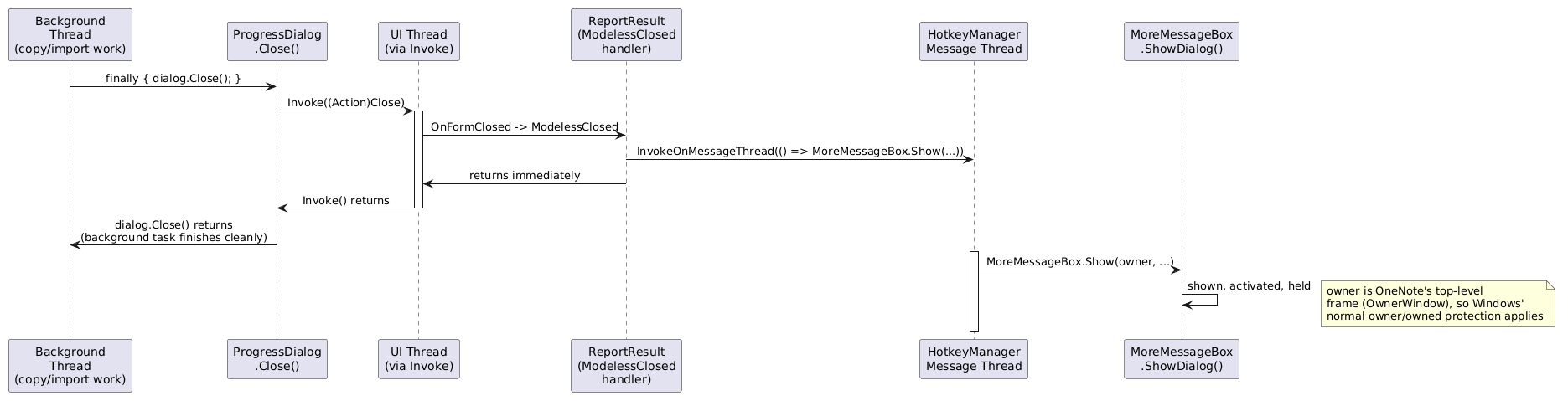
Why ownership resolves to the top-level frame
OneNote.OwnerWindow can't simply wrap the COM Window.WindowHandle property, because that handle isn't guaranteed to be OneNote's top-level window — it can be an inner pane:
|
Structural PlantUML (Extract) |

A dialog owned by a non-top-level HWND has no properly defined Win32 owner/owned relationship, so Windows' normal Z-order and activation protections for "owned" windows don't apply to it. GetTopLevelWindow() — a private helper on OneNote that walks GetParent until there's no parent left — is what OwnerWindow routes through so every dialog is anchored to the real frame instead.
Where this pattern is used today
|
Uses OneNote.SelectLocation (QuickFiling) |
Uses its own setup dialog, same progress+report backbone |
|
CopyFolderCommand, HashtagCommand, SearchCommand, SearchTitleCommand, EmbedCommand/EmbedSubpageCommand |
ArchiveCommand, CheckUrlsCommand, RefreshPageLinksCommand, ImportEvernoteCommand |
Building a new command on this pattern
- Do the real work inside ProgressDialog's work delegate, run via RunModeless — never inline in a picker/dialog callback.
- Let OneNote.OwnerWindow supply every dialog's owner. Don't source a raw COM window handle as an owner anywhere else without routing it through the same top-level resolution.
- Show the follow-up report via HotkeyManager.InvokeOnMessageThread(() => MoreMessageBox.Show(...)) — never directly from the RunModeless closed-action/ModelessClosed handler.
- For forced-activation needs, MoreForm.Elevate() is the proven AttachThreadInput/SetForegroundWindow/BringWindowToTop technique. It solves focus-priority contention; it isn't a substitute for correct ownership or threading if a dialog is being destroyed outright rather than merely losing focus.
- OnActivated (synchronous) is the reliable hook for anything that must run before a window could be lost. OnShown is BeginInvoke-queued and can lose that race.
- ProgressDialog.OnShown's Task.Factory.StartNew(async () => ...) currently has no .Unwrap() (or Task.Run) — a known sharp edge, worth tightening opportunistically if that code is touched again.
- MoreMessageBox.Show(...) accepts optional widthScale/heightScale for report dialogs that need more room, e.g. a long partial-failure list.
History
This pattern was hardened after a regression surfaced during #2455 work, where CopyFolderCommand's report dialog appeared and was torn down within about 20ms — before a user could ever read it.
───────────────────────────────────────────────────────────────────────────────────────────────────
Architecture PlantUML (Refresh)
@startuml
skinparam componentStyle rectangle
actor "User" as user
component "OneNote UI Thread" as one {
[SelectLocation callback] as picker
}
component "Background Worker\n(ThreadPool)" as worker {
[ProgressDialog work delegate] as work
}
component "HotkeyManager\nMessage-Pump Thread" as pump {
[InvokeOnMessageThread] as invoke
}
user -> picker : chooses target
picker -> work : new ProgressDialog(...).RunModeless()\n[returns immediately]
work -> work : performs copy/import/refresh
work -> invoke : on completion,\nMoreMessageBox via InvokeOnMessageThread
invoke -> user : report dialog shown\n(owned by top-level frame)
note right of picker
Released almost instantly —
OneNote's UI thread is never
blocked for the duration of
the background work.
end note
note right of pump
A dedicated, already-running
Application.Run loop — dialog
creation never nests inside a
cross-thread Invoke/Close chain.
end note
@enduml
Sequence PlantUML (Refresh)
@startuml
skinparam sequenceMessageAlign center
participant "Background\nThread\n(copy/import work)" as BG
participant "ProgressDialog\n.Close()" as Close
participant "UI Thread\n(via Invoke)" as UI
participant "ReportResult\n(ModelessClosed\nhandler)" as Report
participant "HotkeyManager\nMessage Thread" as Hotkey
participant "MoreMessageBox\n.ShowDialog()" as Box
BG -> Close: finally { dialog.Close(); }
Close -> UI: Invoke((Action)Close)
activate UI
UI -> Report: OnFormClosed -> ModelessClosed
Report -> Hotkey: InvokeOnMessageThread(() => MoreMessageBox.Show(...))
Report -> UI: returns immediately
UI -> Close: Invoke() returns
deactivate UI
Close -> BG: dialog.Close() returns\n(background task finishes cleanly)
activate Hotkey
Hotkey -> Box: MoreMessageBox.Show(owner, ...)
Box -> Box: shown, activated, held
note right: owner is OneNote's top-level\nframe (OwnerWindow), so Windows'\nnormal owner/owned protection applies
deactivate Hotkey
@enduml
Structural PlantUML (Refresh)
@startsalt
{
{T
+ Framework::CFrame " - OneNote" (top-level window)
++ ... ribbon, tabs, navigation panes ...
++ OneNote::CWorkspace "" (inner pane - what Window.WindowHandle returns)
}
}
@endsalt
#omwiki #omdeveloper #omtechnote
© 2026 Steven M Cohn. All rights reserved.
Please consider a sponsorship or one-time donation to support ongoing development
Created with OneNote.